
Your reps are spending hours every week on manual research before they even pick up the phone. This replaces all of that. It surfaces signals in real time, scores every account against your ICP, and tells the rep exactly what to do next, wired directly to your playbook. Every dashboard is a bespoke build, custom to your business. I build it for you, then hand it over.
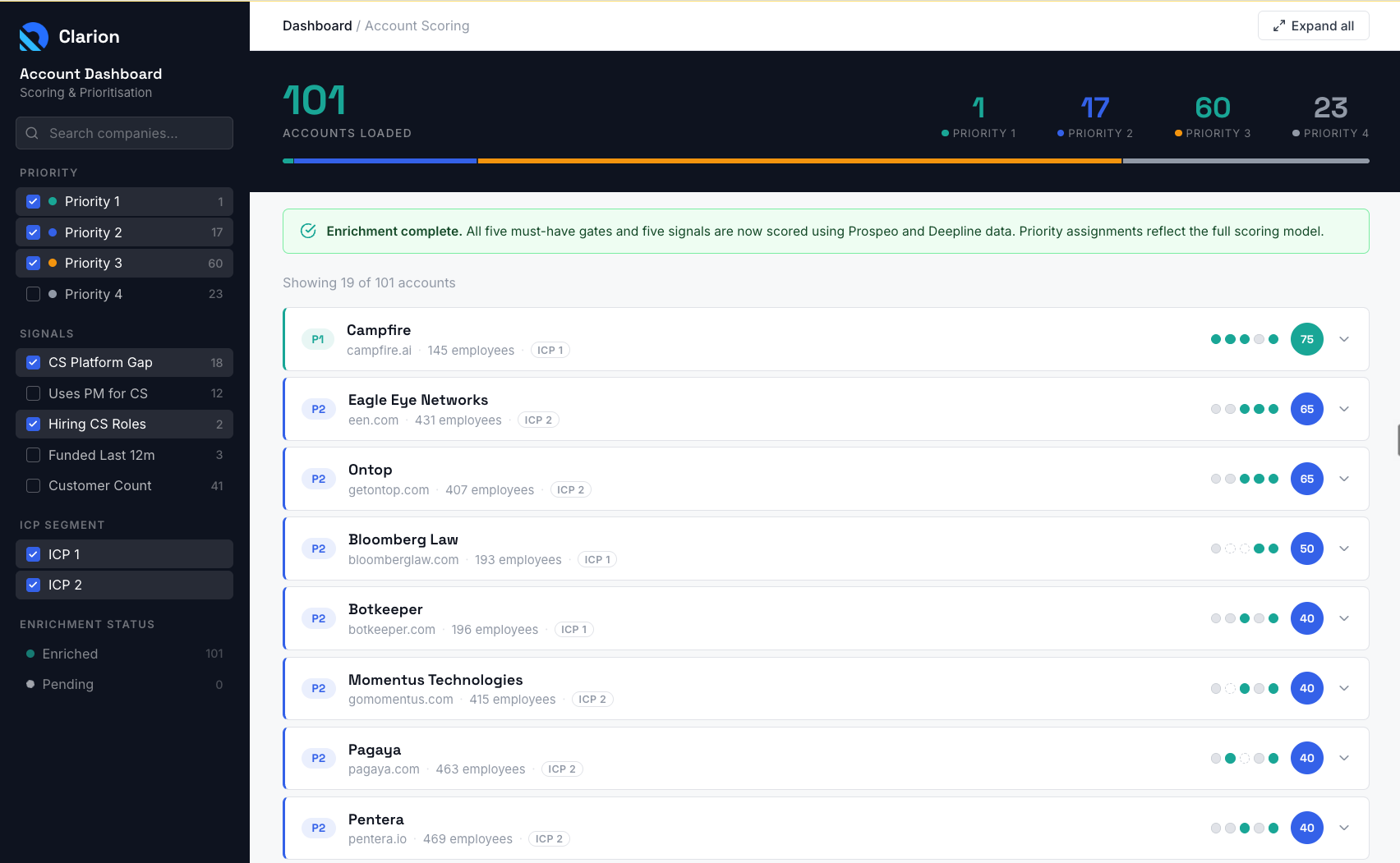
Your ICP criteria, your signals, your disqualification rules. Not a generic lead score. Every build starts from your specific market and motion.
Hiring data, funding rounds, tech installs, customer base growth. Surfaced in real time, not found by a rep opening 15 tabs.
Your team runs it day to day. The criteria update as your motion changes. No dependency on me.
Most reps are given a book of business. 150, maybe 200 accounts. Sometimes at the start of the quarter. Sometimes monthly. And they're told to "work their patch." But there's no system behind it. So they do one of three things.
Work every account the same way. Same sequence, same message, same priority. Hope something sticks.
Go back to the accounts they already know. Skip the ones they haven't heard of. Miss the ones showing signals right now.
I wish I was joking. I've seen reps sort their account list alphabetically and start from the top. Companies beginning with W never get touched.
Here's what actually costs you pipeline: it's not lazy reps. It's the absence of a system that tells them where to look. A rep manually scanning LinkedIn and job boards for 150 accounts will spend five to six hours a week on research before they even pick up the phone. Multiply that by your team size and the number gets uncomfortable fast.
It surfaces signals in real time, so reps aren't chasing stale data. It scores and prioritises automatically, so they're not interpreting spreadsheets. And it connects directly to the playbook, so they know exactly which messaging angle to take and which sequence to run. The grunt work is gone. The rep just executes.
The scoring criteria for a 40-person fintech selling to enterprise banks looks nothing like the criteria for a 150-person HR platform selling to mid-market. Different ICPs, different signals, different must-have gates, different data sources. That's why every dashboard is a bespoke build. I don't configure a tool. I build your system from scratch, grounded in your playbook, your ICP, and the specific signals that matter in your market.
Signals surfaced in real time. Accounts scored and ranked. Playbook briefs attached. The rep goes from "who should I call?" to executing the right play in seconds, not hours.
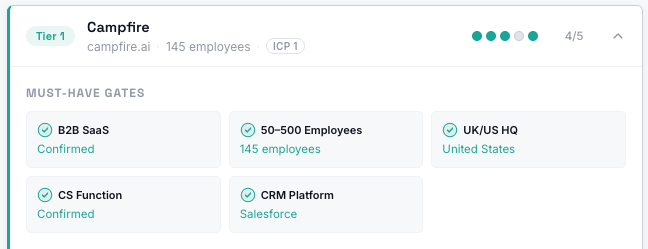
Before a rep spends a second on an account, the dashboard checks it against your non-negotiables. Right industry? Right size? Right geography? Right tech stack? If the account doesn't pass the gates, it doesn't appear in the priority list. Your reps stop wasting time on accounts that were never a fit.
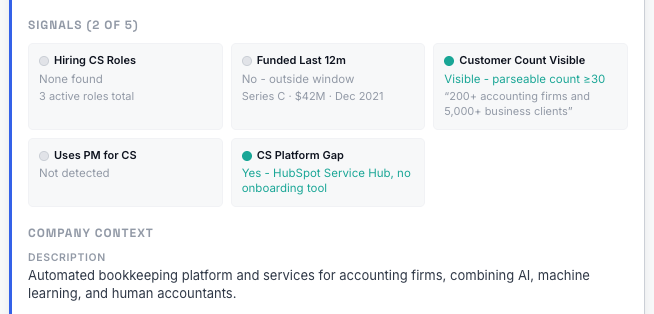
Hiring in the right department. Recent funding. Customer base growing. Using a competitor tool but missing the piece you fill. Each signal adds to the score. The accounts with the most active signals right now rise to the top. Not the ones that looked good three months ago.
The dashboard doesn't just say "this account scores highly." It tells the rep why, and what to do about it. Which playbook to follow. Which messaging angle to take. Which persona to find. The rep doesn't have to figure out the next step. It's already there.
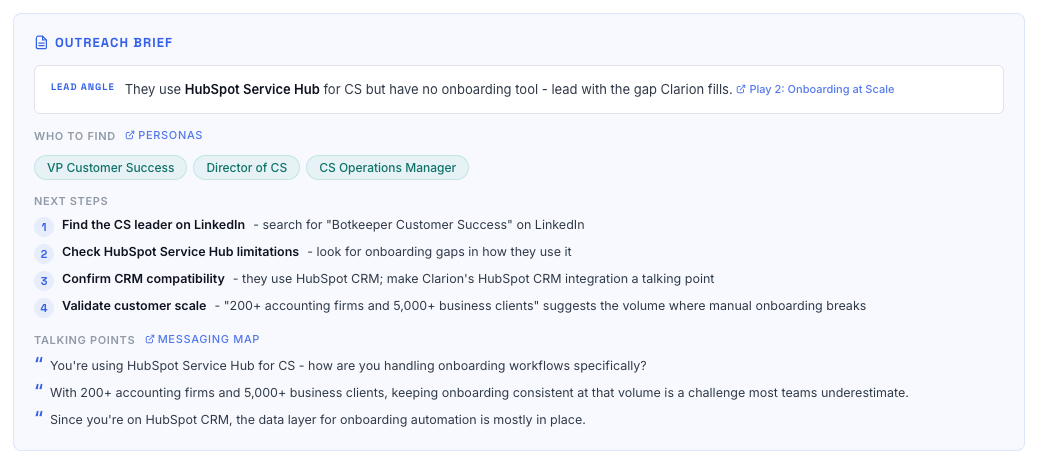
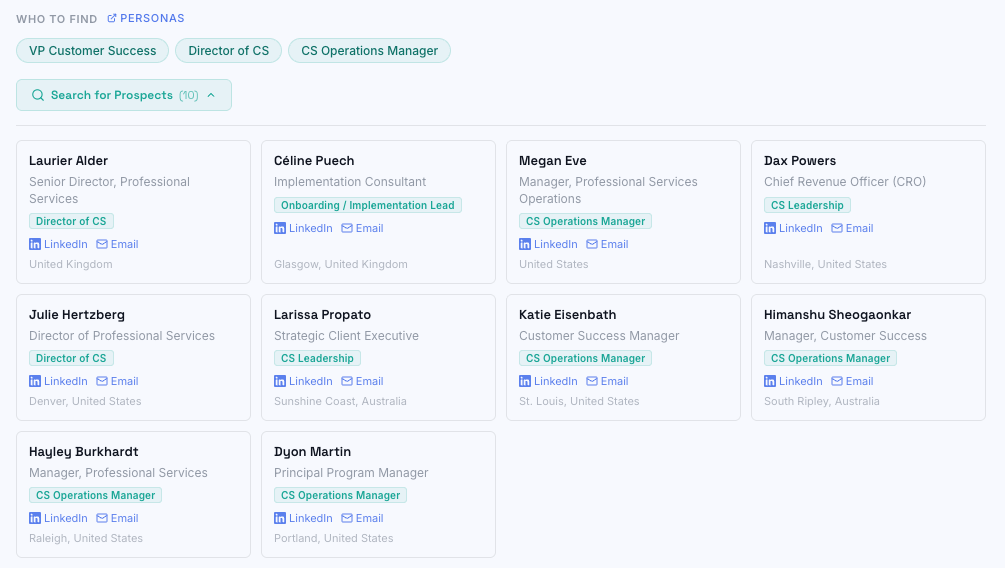
One click to find the right contact at the right company. Job title, LinkedIn profile, ready to go. No switching to another tab, no manual searching, no guessing who to reach out to.
What I've described above uses external signals. Hiring, funding, tech installs, customer base. That alone is more than most reps have ever had. But for the clients I've built this for, we went further.
Deal history. Previous engagement. Open opportunities that went cold. Closed-lost reasons. The dashboard doesn't just tell you this company has signals. It tells you that you spoke to them six months ago and they went dark, and here's why.
G2 category research. Website visitor identification. The accounts that are actively looking at your category right now, cross-referenced with the ones already showing external signals.
Three layers of evidence. External signals, first-party CRM history, and intent. That's what turns this from a nice-to-have into something a rep actually trusts and uses every morning.
Fair question. Here's where the obvious alternatives land, and where this is different.
Familiar. Free. But it doesn't update itself, doesn't score anything, and definitely doesn't tell the rep what to do next. A spreadsheet shows data. It doesn't prioritise it.
This scores, prioritises, and briefs. Automatically.
Better than nothing. But CRM lead scores typically run on firmographic data and engagement history alone. They don't scan for external signals in real time, and they don't link back to your playbook or messaging frameworks.
This layers external signals on top of your CRM, wired to your playbook.
Powerful, but built for RevOps teams with six-figure budgets and months of implementation. If you're a lean team that needs something working in weeks, not quarters, that's overkill.
This is bespoke, right-sized, and yours to own.
I don't build dashboards in isolation. The scoring criteria, the signals, the must-have gates, all of that comes from your playbook and your ICP. If those aren't clear yet, we start there.
Share how reps research accounts today. Your account data, CRM access, current scoring criteria if any exist, and the signals your team already tracks manually.
I take your inputs plus my own research and define the must-have gates, signal criteria, and enrichment sources before we meet, so we're not starting from scratch.
Walk through your current process, lock the ICP, agree the must-have gates and signal criteria.
LiveI define the full scoring model: must-have gates, signal weighting, tiering logic, and enrichment pipeline.
I walk you through the scoring model. You flag anything off before I start building.
LiveI fold your feedback in and finalise the scoring criteria, enrichment sources, and playbook connections.
Nothing needed from you. Scoring model locked by end of week one.
I run the enrichment pipeline, score every account, wire the playbook briefs, and build the live dashboard.
We walk the live dashboard together: tiers, signals, briefs, prospect search.
LiveLast adjustments, plus a short walkthrough video for your wider team.
Your reps get access and start working from it. I make sure every rep knows exactly how it works.
Live · HandoverYour team uses it day to day. I keep the system running in the background.
Signals change. New hires appear. Funding rounds close. The dashboard needs to stay current, and that means the enrichment pipeline keeps running. I keep it hosted, maintained, and the signals updating on an ongoing basis. There's a monthly subscription that covers the infrastructure, enrichment costs, and limited support. You use the dashboard. I keep it running.
But it's not just the time. It's the signals your reps are missing. A rep who was assigned an account three months ago but isn't tracking new signals happening right now has missed that account. And you'll lose to your competitor who reaches out at the right time.
Everything below is yours from day one.
Every account scored, ranked, and briefed. Signals updating automatically. Your reps open it and know exactly where to start.
Built-in contact finding so reps go from "this account is a priority" to "here's the person I'm reaching out to" without switching tools.
The dashboard links directly to your playbook. The right messaging angle, the right sequence, the right approach for each signal. No guessing.
This started as a recommendation from a diagnostic I ran with a client. Their reps were spending hours on manual research every week, but nobody had built the system around it. If that sounds familiar, book a call and I'll show you how it works.
Book Your Call →